

- Mark as New
- Bookmark
- Subscribe
- Subscribe to RSS Feed
- Permalink
- Report Inappropriate Content
05-31-2020 10:34 PM in
Galaxy NoteHello there,
Since around last 1 month my galaxy note 9 is getting hot even when I'm not using it and the temperature goes up to 43 degress when i perfrom 2-3 tasks and since last 2-3 days apps are closing automatically (both in backgroud and foreground).
Even while charging the heat issue occurs. I've tried all methods given on Samsung Website and also performed factory reset but no help.
( Even now when I'm typing this the temperature is at 38-39 degree and there is no app running in background and gps/wifi/bluetooth are off.)
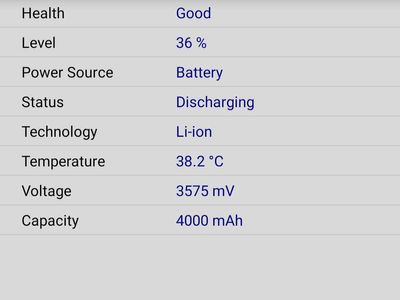
I never trusted Samsung due to its buggy updates that ruin the phone since many years but after 4 years i again purchases Note 9 because i thought that Samsung might have updated that strategy, but no help, they are still the same. Wheneven they launch new phones they provide buggu updated to their old phone and try to push the customer to buy the latest phone.
Please look at it Samsung India and gain the trust again. Your new innovation is remarkable but at last give attention to your previous innovations' results.
Thank you !!
- « Previous
-
- 1
- 2
- Next »
- Mark as New
- Subscribe
- Subscribe to RSS Feed
- Permalink
- Report Inappropriate Content
06-01-2020 11:26 AM in
Galaxy Note
- Mark as New
- Subscribe
- Subscribe to RSS Feed
- Permalink
- Report Inappropriate Content
06-01-2020 11:31 AM (Last edited 06-01-2020 07:01 PM ) in
Galaxy Note
- Mark as New
- Subscribe
- Subscribe to RSS Feed
- Permalink
- Report Inappropriate Content
06-01-2020 06:50 PM in
Galaxy Note
- Mark as New
- Subscribe
- Subscribe to RSS Feed
- Permalink
- Report Inappropriate Content
06-01-2020 10:08 AM in
Galaxy Note
- Mark as New
- Subscribe
- Subscribe to RSS Feed
- Permalink
- Report Inappropriate Content
06-01-2020 11:27 AM in
Galaxy Note
- Mark as New
- Subscribe
- Subscribe to RSS Feed
- Permalink
- Report Inappropriate Content
06-01-2020 06:50 PM in
Galaxy Note
- Mark as New
- Subscribe
- Subscribe to RSS Feed
- Permalink
- Report Inappropriate Content
06-01-2020 08:12 PM in
Galaxy Note
 cs_member10
- Mark as New
- Subscribe
- Subscribe to RSS Feed
- Permalink
06-02-2020 06:52 PM in
Galaxy NoteDear Samsung Member,
Greetings from Samsung Customer Support!
Please be assured and to resolve "Overheating" issue please follow the below given steps:
1)Close background running apps.
2)Uninstall the unnecessary apps.
Overheating--Follow the link for more details :- https://www.samsung.com/in/support/mobile-devices/why-the-heating-issue-occurs-in-mobile-device/
If the issue still persist, kindly register your concern in Samsung Members app (Samsung Members app > Get help > Feedback > Error report/ask question).
Note: Please send device log files within 15 minutes of issue occurrence along with the exact issue details.
Thank you for writing to Samsung.
Warm Regards,
Samsung Customer Support


- « Previous
-
- 1
- 2
- Next »
