

- Mark as New
- Bookmark
- Subscribe
- Subscribe to RSS Feed
- Permalink
- Report Inappropriate Content
04-14-2020 10:36 PM (Last edited 07-25-2020 02:44 PM ) in
Galaxy NoteHi All, You may have seen this problem already in
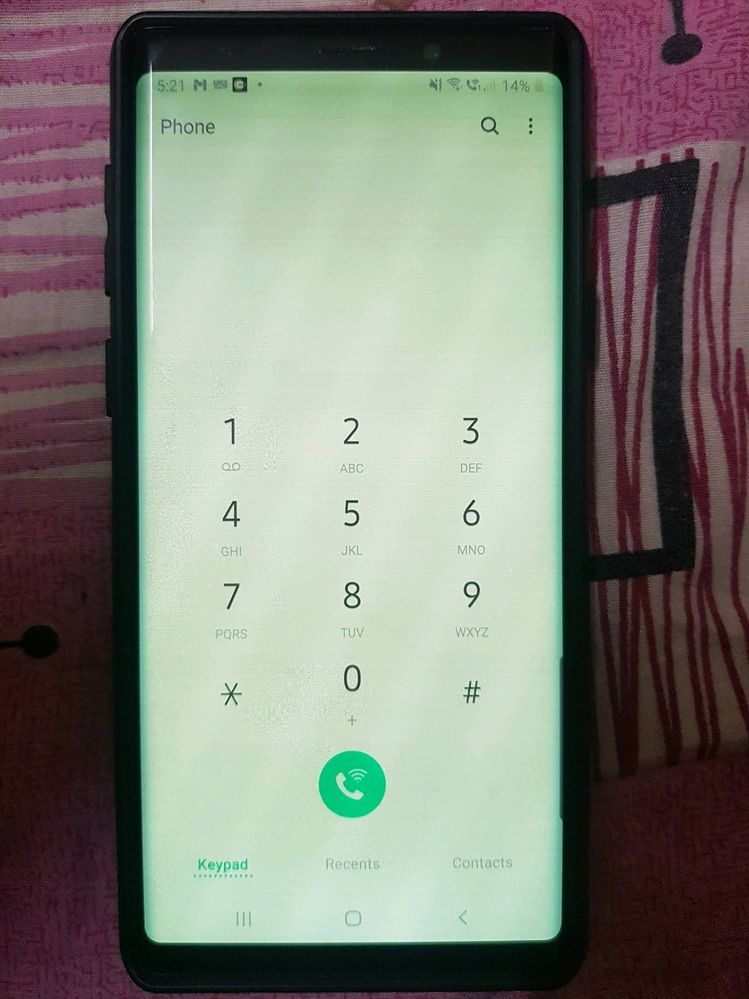
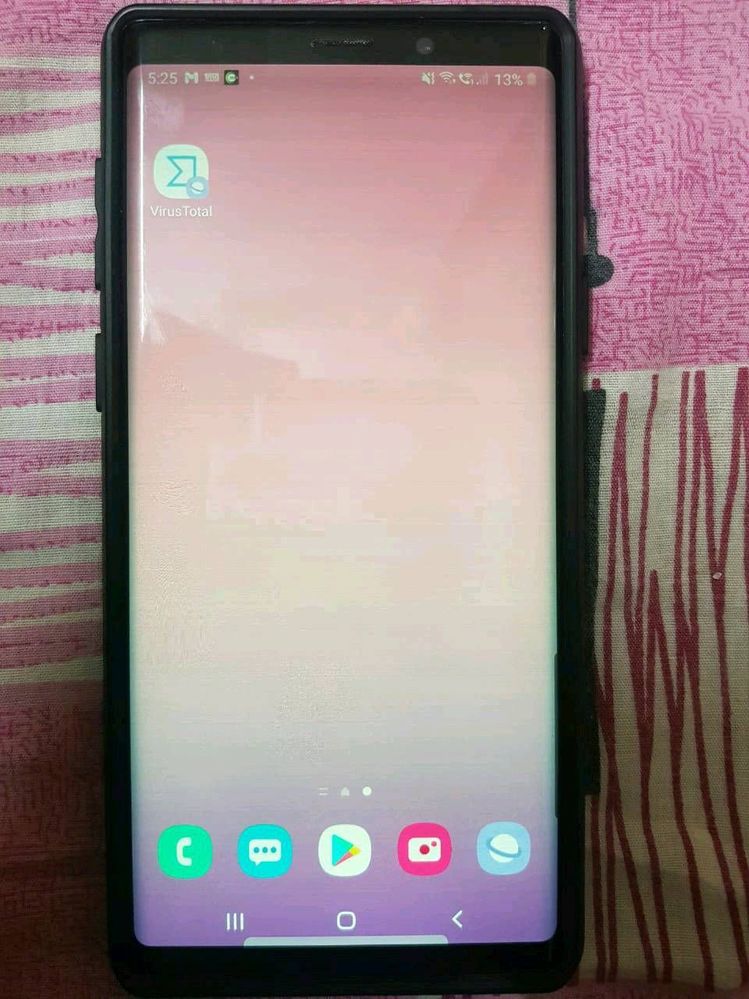
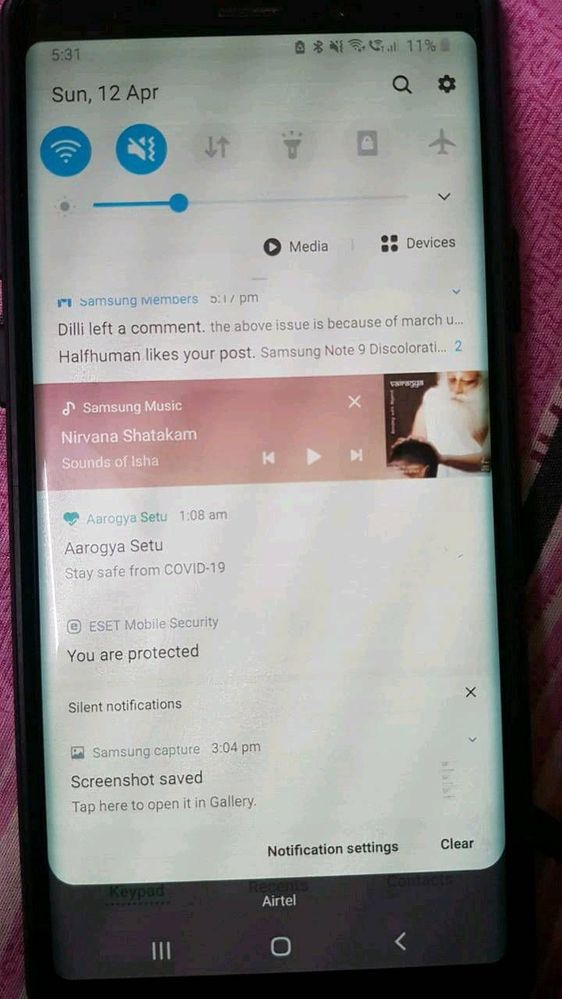
1)Initially, when I unlock phone by pressing power button the display was changed to dim colour(mostly yellowish) and with horizontal lines displayed when the brightness is below 50%. After tried with multiple times pressing on power button the display came back to normal.
2) Next stage, it's not solved with power button. I have to keep my phone aside for some time to get back to normal display. It's been 15 to 20 min then.
3) Now, I would get normal display only in morning. Else, I need to keep my phone idle without touching for at least 4 to 5 hours. I've also changed screen power off time from 30 Sec to 10 Minutes. So that my screen wont turn off and I can keep the normal display. If I forgot to use or kept aside more than 10 min then my screen would go off and display would gone again and irritation starts with that discoloration problem..
4) If display changes to yellowish to reduce the horizontal lines problem I need to increase the brightness to 80 or 85% but this causing my phone with another problem "heating issue"

- Mark as New
- Subscribe
- Subscribe to RSS Feed
- Permalink
- Report Inappropriate Content
08-02-2020 07:45 PM (Last edited 08-02-2020 07:46 PM ) in
Galaxy NoteEven i am facing this screen discoloration problem since the last device update. @Samsung really needs to fix this problem.
Its a software problem @Samsung please solve it for all your users across the globe.
You should check your updates before releasing it worldwide. This kind of service is not expected from a global brand like Samung. Please solve the issue created by yourself at the earliest.
It cause a lot of eye irritation.

- Mark as New
- Subscribe
- Subscribe to RSS Feed
- Permalink
- Report Inappropriate Content
08-04-2020 12:28 PM in
Galaxy Noteyou can hate the chinese, but their phone aren't as expensive and seem to be far more reliable. Sad
- Mark as New
- Subscribe
- Subscribe to RSS Feed
- Permalink
- Report Inappropriate Content
08-05-2020 11:27 AM (Last edited 08-05-2020 11:27 AM ) in
Galaxy Notecommunity forum by many other Note9 Users.
I'm also facing this issue from past 10 days.
1)Initially, when I unlock phone by pressing power button the display was changed to dim colour(mostly yellowish) and with horizontal lines displayed when the brightness is below 50%. After tried with multiple times pressing on power button the display came back to normal.
2) Next stage, it's not solved with power button. I have to keep my phone aside for some time to get back to normal display. It's been 15 to 20 min then.
3) Now, I would get normal display only in morning. Else, I need to keep my phone idle without touching for at least 4 to 5 hours. I've also changed screen power off time from 30 Sec to 10 Minutes. So that my screen wont turn off and I can keep the normal display. If I forgot to use or kept aside more than 10 min then my screen would go off and display would gone again and irritation starts with that discoloration problem..
4) If display changes to yellowish to reduce the horizontal lines problem I need to increase the brightness to 80 or 85% but this causing my phone with another problem "heating issue"
Initially I thought this was my device problem and I felt like i'm in worst situation in this hard time. After searching in community and google I have got to know that Many other users also facing the same issue.

- Mark as New
- Subscribe
- Subscribe to RSS Feed
- Permalink
- Report Inappropriate Content
08-06-2020 01:45 AM (Last edited 08-06-2020 01:45 AM ) in
Galaxy NoteSamsung must think that note 9 is not completed 2 years yet as it is a premium device they must think about this problem..
my note 10+ is working fine now but soo worried about it, i don't update my note 10+ after this note 9 software update issue..

- Mark as New
- Subscribe
- Subscribe to RSS Feed
- Permalink
- Report Inappropriate Content
08-06-2020 10:57 AM in
Galaxy Notekeep phone in freezer for 5 to 10 mins.. and turn off adaptive display and also turn on Always on display option of clock on screen.. Additionally delete some apps, so that phone stays cool.. Problem will be temporarily solved.. Issue occurs because the processor and ram are heavy but the wires connecting the display and display panel itself is sensitive to heat produced by the phone engine (processor and ram). Seems like Samsung has not worked on its heat sinks with note 9.
- Mark as New
- Subscribe
- Subscribe to RSS Feed
- Permalink
- Report Inappropriate Content
08-06-2020 12:24 PM in
Galaxy NoteI’m having the same issue. My phone screen turn green and need to keep phone away for sometime to get the display back for few seconds
- Mark as New
- Subscribe
- Subscribe to RSS Feed
- Permalink
- Report Inappropriate Content
08-07-2020 06:39 AM in
Galaxy NoteI am having the same issue, Samsung has to provide a solution to this issue. I have tried everything and nothing seems to work, if Samsung can't fix it they should replace our equipment, this is a ripoff.
- Mark as New
- Subscribe
- Subscribe to RSS Feed
- Permalink
- Report Inappropriate Content
08-09-2020 09:41 AM in
Galaxy Notehi there I also have now similar problem as you are...hope that samsung will finally acknowledge this glitch and make a solution on this so we could use our phone with no problem... please if there is an update to solve this problem kindly post right away
- Mark as New
- Subscribe
- Subscribe to RSS Feed
- Permalink
- Report Inappropriate Content
08-10-2020 06:55 AM in
Galaxy NoteI have the same problem with my Galaxy note 9 after security patch update
- Mark as New
- Subscribe
- Subscribe to RSS Feed
- Permalink
- Report Inappropriate Content
08-10-2020 07:38 PM in
Galaxy Note


