

- Mark as New
- Bookmark
- Subscribe
- Subscribe to RSS Feed
- Permalink
- Report Inappropriate Content
03-25-2021 01:07 AM (Last edited 03-25-2021 01:10 AM ) in
Galaxy M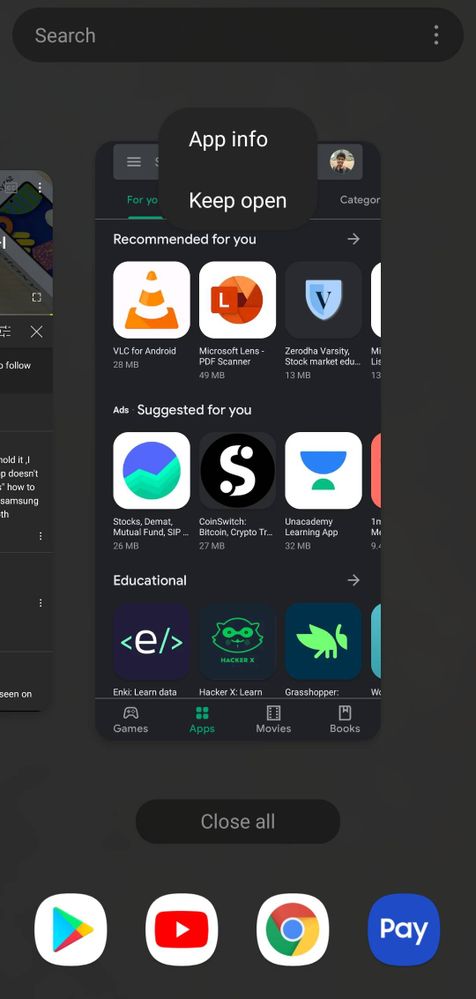
- Mark as New
- Subscribe
- Subscribe to RSS Feed
- Permalink
- Report Inappropriate Content
03-25-2021 01:46 AM in
Galaxy M
- Mark as New
- Subscribe
- Subscribe to RSS Feed
- Permalink
- Report Inappropriate Content
04-30-2021 02:51 PM in
Galaxy M
- Mark as New
- Subscribe
- Subscribe to RSS Feed
- Permalink
- Report Inappropriate Content
05-19-2021 10:05 PM in
Galaxy M
- Mark as New
- Subscribe
- Subscribe to RSS Feed
- Permalink
- Report Inappropriate Content
03-25-2021 03:03 AM in
Galaxy MSettings>general management>select reset>click on reset settings
Also not all apps support split screen

- Mark as New
- Subscribe
- Subscribe to RSS Feed
- Permalink
- Report Inappropriate Content
05-12-2021 12:42 AM in
Galaxy Mmere me bhi same problem hay sabhi kar liya .Even galaxy store me bhi chala gaya waha bhi kuch nahi hota

- Mark as New
- Subscribe
- Subscribe to RSS Feed
- Permalink
- Report Inappropriate Content
03-25-2021 03:33 AM in
Galaxy M1. First open an app that you want to open as split screen
2.then click home button
3.then click recent buttons
4.from there find your app and long press the icon as you see my first screenshot
5. Then you will find an option for split screen . Just click it
Let me know if this works or not



- Mark as New
- Subscribe
- Subscribe to RSS Feed
- Permalink
- Report Inappropriate Content
04-08-2021 12:11 AM (Last edited 04-08-2021 12:15 AM ) in
Galaxy M
- Mark as New
- Subscribe
- Subscribe to RSS Feed
- Permalink
- Report Inappropriate Content
04-08-2021 12:23 AM in
Galaxy M
- Mark as New
- Subscribe
- Subscribe to RSS Feed
- Permalink
- Report Inappropriate Content
04-08-2021 12:26 AM (Last edited 04-08-2021 12:29 AM ) in
Galaxy M
- Mark as New
- Subscribe
- Subscribe to RSS Feed
- Permalink
- Report Inappropriate Content
04-08-2021 02:57 PM in
Galaxy M
