SuNnY2212
Active Level 3
Options
- Mark as New
- Subscribe to RSS Feed
- Permalink
01-23-2021 05:25 PM in
Tech Talk
I can't see split screen for multiple apps functioning could you please make it stable.
Solved! Go to Solution.

ѵօϲɑӀ4ӀօϲɑӀ
★★
Options
- Mark as New
- Subscribe to RSS Feed
- Permalink
01-23-2021 06:02 PM in
Tech Talk
This depends on Apps bhai, Samsung can't force every app to be used in split screen.
If that helped or solved your query "Accept as solution" will be appreciated.
If that helped or solved your query "Accept as solution" will be appreciated.


Solution

Ehsank
Expert Level 5
Options
- Mark as New
- Subscribe to RSS Feed
- Permalink
01-23-2021 06:53 PM in
Tech Talk
yes sure
1. Download the "zfont3"App from playstore 👇👇
https://play.google.com/store/apps/details?id=com.htetznaing.zfont2
2. Open it and click on "dashboard "
3. Click on "Monotype font" (Samsung one ui supported fonts here only)
4. Click on specific font.
5. Click on install.
6. Click on "Change font" and done👍
More info in this post;
https://r2.community.samsung.com/t5/Others/Zfont/td-p/6608425
1. Download the "zfont3"App from playstore 👇👇
https://play.google.com/store/apps/details?id=com.htetznaing.zfont2
2. Open it and click on "dashboard "
3. Click on "Monotype font" (Samsung one ui supported fonts here only)
4. Click on specific font.
5. Click on install.
6. Click on "Change font" and done👍
More info in this post;
https://r2.community.samsung.com/t5/Others/Zfont/td-p/6608425

Solution
Ehsank
Expert Level 5
Options
- Mark as New
- Subscribe to RSS Feed
- Permalink
01-23-2021 06:57 PM in
Tech Talk
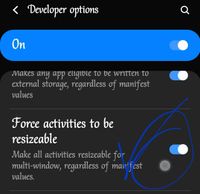
you can split almost all apps by enable this option in developer option
I attached image
Steps to enable developer option
settings >about phone>software information >then u find build number >tap 7 times>then back to settings
and at end of settings one new option called developer option
click on it and find that option
I attached image
Steps to enable developer option
settings >about phone>software information >then u find build number >tap 7 times>then back to settings
and at end of settings one new option called developer option
click on it and find that option