

Techboy
Active Level 3
Options
- Mark as New
- Subscribe to RSS Feed
- Permalink
08-13-2020 07:26 AM in
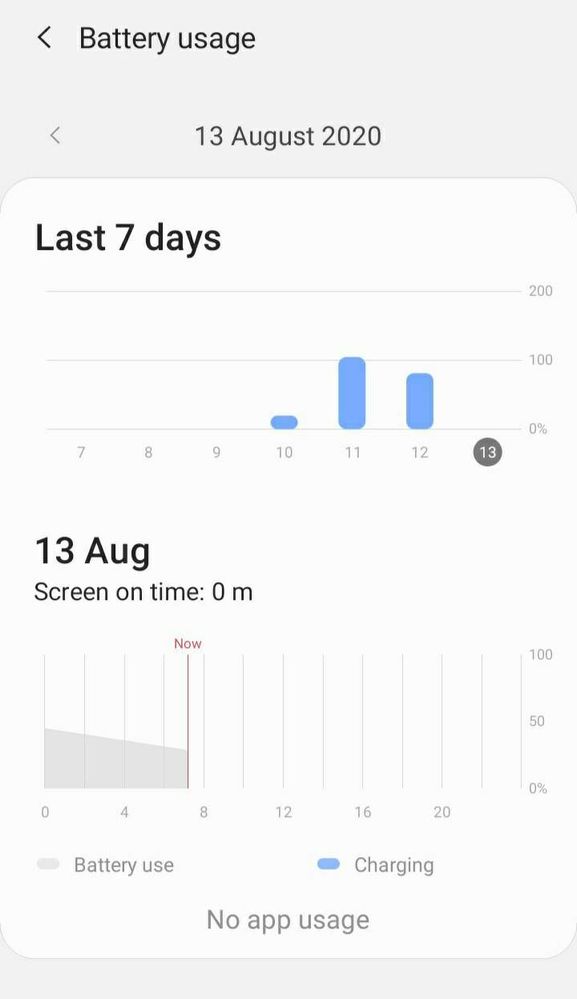
Tech TalkMy device is On8 2018 model. My phone has to be charged 2 times a day after the Android 10 update. Even if the switch is off, the battery is running out. There was no solution by formatting. The battery was ok before the update. I don't know what to do now.


AjaiX2015
Active Level 8
Options
- Mark as New
- Subscribe to RSS Feed
- Permalink
08-13-2020 07:45 AM in
Tech Talk
Turn on automatic optimization, Adaptive battery and put background apps to sleep all you can find in device care > battery.
also turn on airplane mode during night in order to reduce battery draining issue.
Also check which are the apps that are draining this much battery in standby modes. In worst cases this maybe an indication of malware attack.
also turn on airplane mode during night in order to reduce battery draining issue.
Also check which are the apps that are draining this much battery in standby modes. In worst cases this maybe an indication of malware attack.

Jarjees1994
Active Level 4
Options
- Mark as New
- Subscribe to RSS Feed
- Permalink
08-13-2020 07:50 AM in
Tech Talk
it's may be software issue differently solve this problem upcoming updates. Samsung UI 2 has more features.
if you kindly check below option
1. checking background app running.( optimizer )
2. screen time out
3. Put sleep to unused appliances and also manually disable
enough that maintenance your mobile battery charger🙃
if you kindly check below option
1. checking background app running.( optimizer )
2. screen time out
3. Put sleep to unused appliances and also manually disable
enough that maintenance your mobile battery charger🙃

rajkm008
Active Level 10
Options
- Mark as New
- Subscribe to RSS Feed
- Permalink
08-13-2020 08:15 AM (Last edited 08-16-2020 12:47 AM ) in
Tech Talk
its usually happens when you update to the newer versions or security patches, you have left only two options 1. reset the device once ( create backup before resetting the device)
2. Visit Nearby Samsung service centre and ask them to reinstall operating system and ask them to check about battery condition
2. Visit Nearby Samsung service centre and ask them to reinstall operating system and ask them to check about battery condition
rajkm008
Active Level 10
Options
- Mark as New
- Subscribe to RSS Feed
- Permalink
08-13-2020 08:19 AM (Last edited 08-13-2020 08:19 AM ) in
Tech Talk

