

- Mark as New
- Subscribe to RSS Feed
- Permalink
11-02-2020 03:11 AM in
Others
- Mark as New
- Subscribe to RSS Feed
- Permalink
11-02-2020 04:26 AM (Last edited 11-02-2020 04:29 AM ) in
Othersor in setting go to advanced features then motion and gestures turn on palm swipe to capture


- Mark as New
- Subscribe to RSS Feed
- Permalink
11-02-2020 08:08 AM in
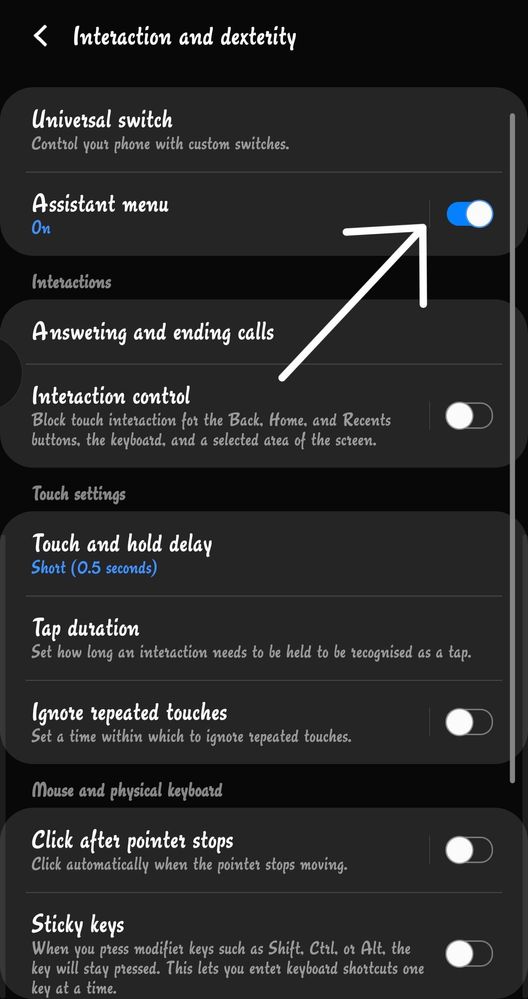
Othersgo to settings>accessibility>Interaction and Dexterity>Assistant menu feature
or
install one hand operation+
http://apps.samsung.com/appquery/appDetail.as?appId=com.samsung.android.sidegesturepad




- Mark as New
- Subscribe to RSS Feed
- Permalink
11-02-2020 08:15 AM in
Others
- Mark as New
- Subscribe to RSS Feed
- Permalink
11-02-2020 09:14 AM in
Others

- Mark as New
- Subscribe to RSS Feed
- Permalink
11-02-2020 09:40 AM in
Others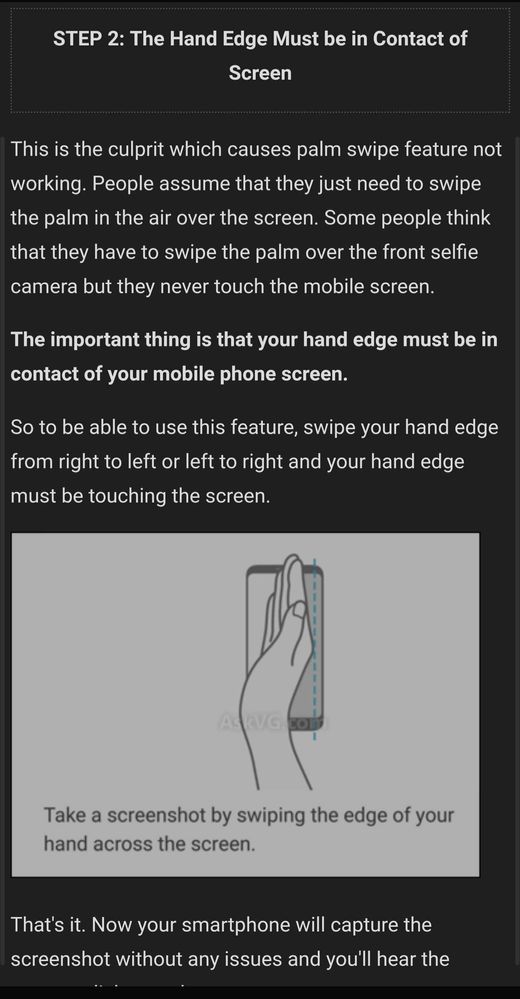

- Mark as New
- Subscribe to RSS Feed
- Permalink
11-02-2020 09:15 AM (Last edited 11-02-2020 09:17 AM ) in
Others

