

- Mark as New
- Bookmark
- Subscribe
- Subscribe to RSS Feed
- Permalink
- Report Inappropriate Content
11-24-2018 03:42 PM (Last edited 03-16-2019 05:12 PM ) in
Galaxy S
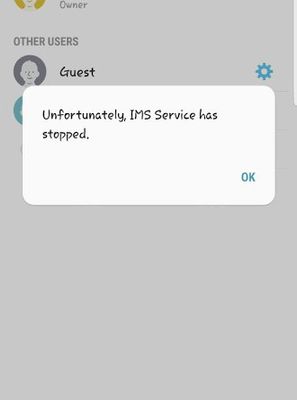
We are try : -
Wipe data
Factory reset
Frimwere update via service centre
Application data clear
All of that not working
Model : Galaxy S8 India
- « Previous
-
- 1
- 2
- Next »

- Mark as New
- Subscribe
- Subscribe to RSS Feed
- Permalink
- Report Inappropriate Content
11-24-2018 05:08 PM in
Galaxy SSettings->apps->click on the 3 dots present on the right side top of the screen->Default apps->messaging app->select the other app other than messages present over there and then select back to the messages
Hope this helps. It worked for me

- Mark as New
- Subscribe
- Subscribe to RSS Feed
- Permalink
- Report Inappropriate Content
11-24-2018 05:39 PM in
Galaxy Splease support this.
#ssecureforgalaxys8
- Mark as New
- Subscribe
- Subscribe to RSS Feed
- Permalink
- Report Inappropriate Content
11-24-2018 05:41 PM in
Galaxy SI think this will help you.

- Mark as New
- Subscribe
- Subscribe to RSS Feed
- Permalink
- Report Inappropriate Content
11-24-2018 05:44 PM in
Galaxy S
- Mark as New
- Subscribe
- Subscribe to RSS Feed
- Permalink
- Report Inappropriate Content
11-24-2018 09:49 PM in
Galaxy S
- Mark as New
- Subscribe
- Subscribe to RSS Feed
- Permalink
- Report Inappropriate Content
11-25-2018 01:03 AM in
Galaxy SHope this helps. It worked for m
- Mark as New
- Subscribe
- Subscribe to RSS Feed
- Permalink
- Report Inappropriate Content
11-26-2018 01:50 PM in
Galaxy S
- Mark as New
- Subscribe
- Subscribe to RSS Feed
- Permalink
- Report Inappropriate Content
11-26-2018 03:02 PM in
Galaxy SFor Further assistance, you can get in touch with us via Live Chat option by following- http://livechat.support.samsung.com/Customer_new/IN. You can also connect us via Samsung Members web community by following mentioned url-https://community.samsungmembers.com/en_IN#/

- Mark as New
- Subscribe
- Subscribe to RSS Feed
- Permalink
- Report Inappropriate Content
11-27-2018 12:08 AM in
Galaxy S
- Mark as New
- Subscribe
- Subscribe to RSS Feed
- Permalink
- Report Inappropriate Content
12-08-2018 09:03 PM in
Galaxy S
- « Previous
-
- 1
- 2
- Next »
