Brahmin
Active Level 2
Options
- Mark as New
- Subscribe to RSS Feed
- Permalink
04-10-2021 11:49 AM in
Tech Talk
Can samsung please add multi window support in this phone..(galaxy A50s)..
Open two apps at same time...
This feature in this phone only works during notification...
Solved! Go to Solution.
5 Comments


iamiceparticle
Expert Level 5
Options
- Mark as New
- Subscribe to RSS Feed
- Permalink
04-10-2021 01:58 PM (Last edited 04-10-2021 02:00 PM ) in
Tech Talk
There are various ways to use multi window.
1. Mentioned by Sidhabhi above.
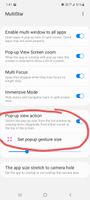
2. Install good lock app. Then install multi star. Enable multi window for all apps either from here or from developer options.
There you can quickly resize the apps by swiping from top left and top right corner.
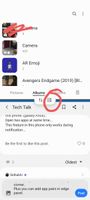
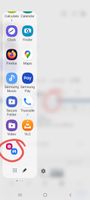
3. You can add app pairs in edge panel. For that you need to open 2 apps in multi window screen and then click on the separator and click the + icon.
4. Use one hand operation + action to launch split screen view.
1. Mentioned by Sidhabhi above.
2. Install good lock app. Then install multi star. Enable multi window for all apps either from here or from developer options.
There you can quickly resize the apps by swiping from top left and top right corner.
3. You can add app pairs in edge panel. For that you need to open 2 apps in multi window screen and then click on the separator and click the + icon.
4. Use one hand operation + action to launch split screen view.