

- Mark as New
- Bookmark
- Subscribe
- Subscribe to RSS Feed
- Permalink
03-31-2023 11:53 AM (Last edited 03-31-2023 02:52 PM ) in
Tech TalkGone are the days when you had to glance at an image repetitively and painstakingly to obtain a few pieces of information.
With the One UI 5 Extract Text feature, Samsung provides an intelligent input experience.
There are two ways of using this feature:
a) Long press on any input-field and tap the "Extract text" option
b) Open the keyboard on any input-field and select the "Extract text" toolbar option
Extract Text has the context-aware ability, developed using artificial intelligence, to derive relevant information basis the application/text box in use. In easier words, it knows when to scan phone numbers and when to get email addresses.
Let us check out the various use cases of this exciting feature!
You want to get all the content from a visiting card and do not want the hassle of staring at the number, and email address. We all have messed up with an extra digit while writing down repetitive numbers. The animations below show how easily you can extract text by:
a) Tapping the “Extract Text” icon on the keyboard toolbar

b) Long Pressing on any input-field, and selecting the “Extract Text” menu option

c) Here is the interesting part. You want to enter the phone number in the Contact box, right? - Long press on the any input-field or open through the toolbar to scan only the phone number.
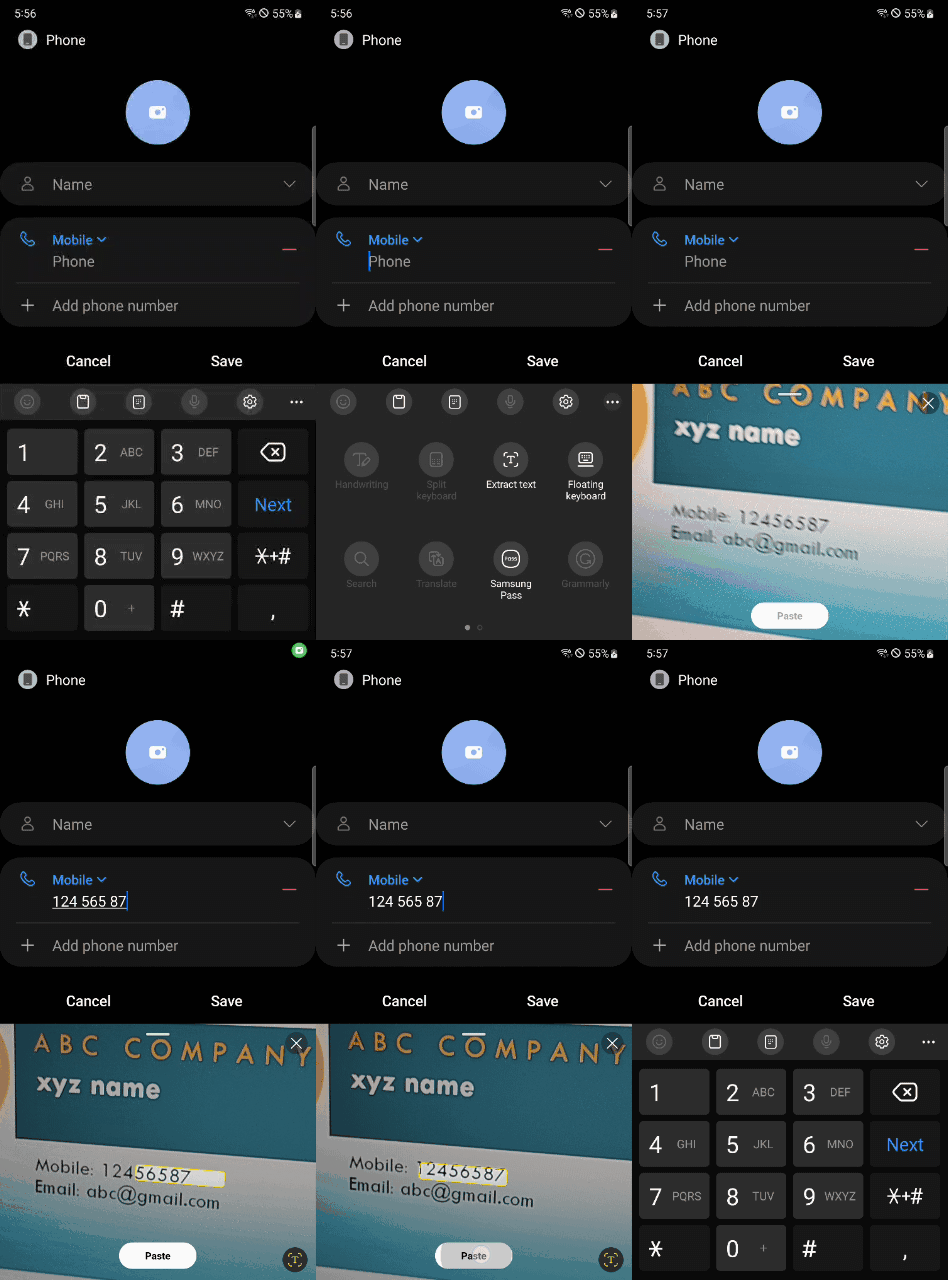
d) The same applies for email address field. It works seamlessly to increase your productivity

We hope you enjoy using Extract Text as much as we liked developing it.
Let us know your feedback or queries by dropping a note in the comments section!

- Mark as New
- Subscribe
- Subscribe to RSS Feed
- Permalink
- Report Inappropriate Content
04-03-2023 03:17 PM in
Tech Talk
- Mark as New
- Subscribe
- Subscribe to RSS Feed
- Permalink
- Report Inappropriate Content
04-03-2023 03:58 PM in
Tech TalkPlease answer me.

- Mark as New
- Subscribe
- Subscribe to RSS Feed
- Permalink
- Report Inappropriate Content
04-03-2023 07:05 PM in
Tech Talk
- Mark as New
- Subscribe
- Subscribe to RSS Feed
- Permalink
- Report Inappropriate Content
04-03-2023 09:07 PM in
Tech Talk
- Mark as New
- Subscribe
- Subscribe to RSS Feed
- Permalink
- Report Inappropriate Content
04-03-2023 10:17 PM in
Tech Talk
- Mark as New
- Subscribe
- Subscribe to RSS Feed
- Permalink
- Report Inappropriate Content
04-04-2023 10:09 AM in
Tech Talk
- Mark as New
- Subscribe
- Subscribe to RSS Feed
- Permalink
- Report Inappropriate Content
04-04-2023 10:22 AM in
Tech Talk
- Mark as New
- Subscribe
- Subscribe to RSS Feed
- Permalink
- Report Inappropriate Content
04-04-2023 10:23 AM in
Tech Talk
- Mark as New
- Subscribe
- Subscribe to RSS Feed
- Permalink
- Report Inappropriate Content
04-04-2023 10:29 AM in
Tech Talk
- Mark as New
- Subscribe
- Subscribe to RSS Feed
- Permalink
- Report Inappropriate Content
04-04-2023 11:02 AM in
Tech Talk
