

- Mark as New
- Bookmark
- Subscribe
- Subscribe to RSS Feed
- Permalink
- Report Inappropriate Content
11-06-2017 06:39 AM (Last edited 03-14-2019 05:47 PM ) in
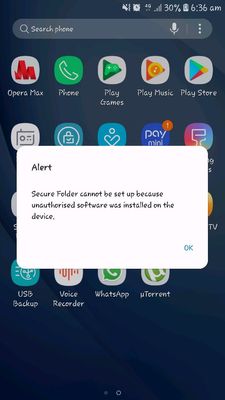
Secure Folderi went to samsung service center they said.." update will come wait for that".

- Tags:
- on8
- securefolder
- Mark as New
- Subscribe
- Subscribe to RSS Feed
- Permalink
- Report Inappropriate Content
11-06-2017 06:54 AM in
Secure Folder
- Mark as New
- Subscribe
- Subscribe to RSS Feed
- Permalink
- Report Inappropriate Content
11-06-2017 06:56 AM in
Secure Folder
- Mark as New
- Subscribe
- Subscribe to RSS Feed
- Permalink
- Report Inappropriate Content
11-06-2017 07:06 AM in
Secure Folder
- Mark as New
- Subscribe
- Subscribe to RSS Feed
- Permalink
- Report Inappropriate Content
11-06-2017 07:04 AM in
Secure Folder
- Mark as New
- Subscribe
- Subscribe to RSS Feed
- Permalink
- Report Inappropriate Content
11-06-2017 07:23 AM in
Secure Folder
- Mark as New
- Subscribe
- Subscribe to RSS Feed
- Permalink
- Report Inappropriate Content
11-06-2017 07:32 AM in
Secure Folder
- Mark as New
- Subscribe
- Subscribe to RSS Feed
- Permalink
- Report Inappropriate Content
11-06-2017 07:35 AM (Last edited 03-13-2019 08:07 PM ) in
Secure Folder

- Mark as New
- Subscribe
- Subscribe to RSS Feed
- Permalink
- Report Inappropriate Content
11-06-2017 07:38 AM in
Secure Folder
- Mark as New
- Subscribe
- Subscribe to RSS Feed
- Permalink
- Report Inappropriate Content
11-06-2017 07:41 AM in
Secure Folder
