

srustith
Active Level 7
Options
- Mark as New
- Bookmark
- Subscribe
- Subscribe to RSS Feed
- Permalink
- Report Inappropriate Content
04-08-2017 12:11 PM (Last edited 03-14-2019 09:34 PM ) in
Others
WTF is this, how to turn off...😤😤😤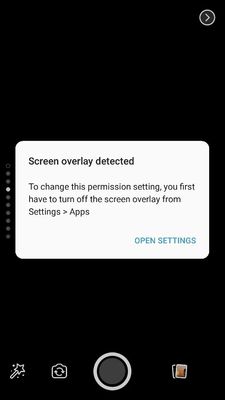
5 Comments
srustith
Active Level 7
Options
- Mark as New
- Subscribe
- Subscribe to RSS Feed
- Permalink
- Report Inappropriate Content
04-08-2017 12:14 PM in
Others
please any body help meeeee😭😭😭

Anonymous
Not applicable
Options
- Mark as New
- Subscribe
- Subscribe to RSS Feed
- Permalink
- Report Inappropriate Content
04-08-2017 12:20 PM in
Others
open that setting and give permission to camera app

Bro
Active Level 6
Options
- Mark as New
- Subscribe
- Subscribe to RSS Feed
- Permalink
- Report Inappropriate Content
04-08-2017 12:48 PM in
Others
https://youtu.be/t8DEiUVO73Y

Samsung_India_
Active Level 10
Options
- Mark as New
- Subscribe
- Subscribe to RSS Feed
- Permalink
- Report Inappropriate Content
04-10-2017 03:22 PM in
Others
Thank you for sharing your concern. We would request you follow below mentioned steps:
1. Click on Open setting (When shows error Message)
2. Click on more setting > show system apps.
3. Disable all apps from there but do not disable Google play services.
4. Go to setting >application >application manager > any app > allow all permissions.
1. Click on Open setting (When shows error Message)
2. Click on more setting > show system apps.
3. Disable all apps from there but do not disable Google play services.
4. Go to setting >application >application manager > any app > allow all permissions.
srustith
Active Level 7
Options
- Mark as New
- Subscribe
- Subscribe to RSS Feed
- Permalink
- Report Inappropriate Content
04-10-2017 03:53 PM in
Others
thank u
