

- Mark as New
- Bookmark
- Subscribe
- Subscribe to RSS Feed
- Permalink
- Report Inappropriate Content
02-06-2021 11:52 AM in
Galaxy Note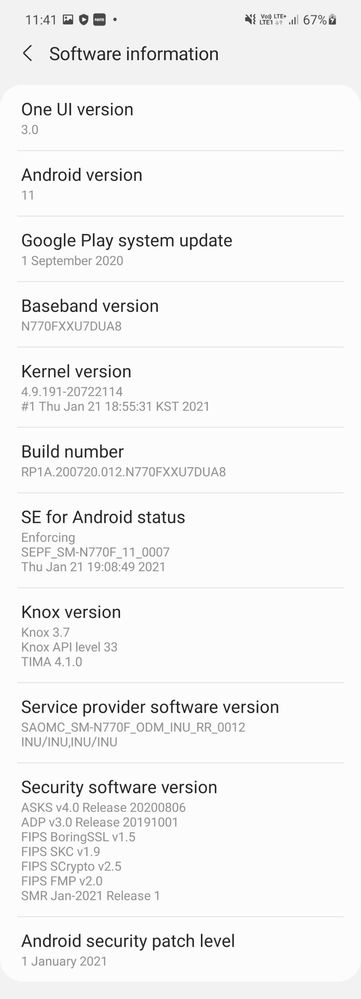

- Mark as New
- Subscribe
- Subscribe to RSS Feed
- Permalink
- Report Inappropriate Content
02-06-2021 11:55 AM in
Galaxy NoteDon't forget to CLER CACHE PARTITION ON YOUR PHONE to fix any bugs if present.
if you don't know how to do so..
please do let me know I'll help.
- Mark as New
- Subscribe
- Subscribe to RSS Feed
- Permalink
- Report Inappropriate Content
02-06-2021 11:56 AM (Last edited 02-06-2021 08:56 PM ) in
Galaxy Note1. Turn off your phone...Connect your phone to laptop/pc with a type- C cable.
2. Press Volume up and power button(and also bixby button if present) at the same time .
3. Keep it pressed until samsung logo appears on your phone.
4. Then a list of your options will come on your phone..
Go to Clear Cache Partition option by navigating through volume buttons.
5. After selecting Clear Cache Partition option,then click power button once.
6. Once Cache is cleared you will be taken to first option..Then again click power button to restart the phone
- Mark as New
- Subscribe
- Subscribe to RSS Feed
- Permalink
- Report Inappropriate Content
02-06-2021 08:20 PM in
Galaxy Note
- Mark as New
- Subscribe
- Subscribe to RSS Feed
- Permalink
- Report Inappropriate Content
02-06-2021 08:50 PM in
Galaxy Note
- Mark as New
- Subscribe
- Subscribe to RSS Feed
- Permalink
- Report Inappropriate Content
02-06-2021 08:54 PM (Last edited 02-06-2021 08:57 PM ) in
Galaxy NoteAnd then try the above steps.
Sorry Again. I have corrected the above steps. Now read it and try again .
And let me know what happens.
- Mark as New
- Subscribe
- Subscribe to RSS Feed
- Permalink
- Report Inappropriate Content
02-06-2021 08:55 PM in
Galaxy Note
- Mark as New
- Subscribe
- Subscribe to RSS Feed
- Permalink
- Report Inappropriate Content
02-06-2021 07:54 PM in
Galaxy Note
- Mark as New
- Subscribe
- Subscribe to RSS Feed
- Permalink
- Report Inappropriate Content
02-06-2021 07:58 PM in
Galaxy Note
- Mark as New
- Subscribe
- Subscribe to RSS Feed
- Permalink
- Report Inappropriate Content
02-06-2021 08:19 PM in
Galaxy Noteare you able to connect?

