

- Mark as New
- Bookmark
- Subscribe
- Subscribe to RSS Feed
- Permalink
- Report Inappropriate Content
01-03-2020 01:07 PM (Last edited 01-03-2020 01:11 PM ) in
Galaxy M
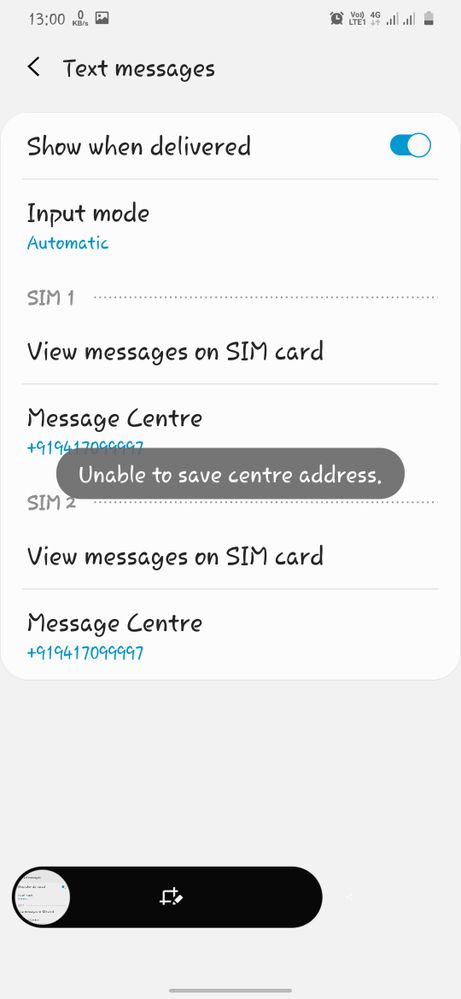

Solved! Go to Solution.

- Mark as New
- Subscribe
- Subscribe to RSS Feed
- Permalink
- Report Inappropriate Content
09-23-2025 04:04 PM in
Galaxy M
- Mark as New
- Subscribe
- Subscribe to RSS Feed
- Permalink
- Report Inappropriate Content
01-04-2020 01:23 AM in
Galaxy M
- Mark as New
- Subscribe
- Subscribe to RSS Feed
- Permalink
- Report Inappropriate Content
01-04-2020 04:53 PM in
Galaxy M
- Mark as New
- Subscribe
- Subscribe to RSS Feed
- Permalink
- Report Inappropriate Content
01-04-2020 06:30 PM in
Galaxy M
- Mark as New
- Subscribe
- Subscribe to RSS Feed
- Permalink
- Report Inappropriate Content
01-04-2020 07:32 PM in
Galaxy M
- Mark as New
- Subscribe
- Subscribe to RSS Feed
- Permalink
- Report Inappropriate Content
10-29-2020 06:20 PM in
Galaxy MSame problem for my Galaxy M 21. Can't install any Wallet Apps. Feeling bad about Samsung. This is my first Samsung phone in last 20 years. Hope it recovers soon.
- Mark as New
- Subscribe
- Subscribe to RSS Feed
- Permalink
- Report Inappropriate Content
07-29-2020 10:40 AM in
Galaxy MThe above solution is not working with M21
- Mark as New
- Subscribe
- Subscribe to RSS Feed
- Permalink
- Report Inappropriate Content
01-04-2020 07:35 PM in
Galaxy M
- Mark as New
- Subscribe
- Subscribe to RSS Feed
- Permalink
- Report Inappropriate Content
01-04-2020 08:36 PM in
Galaxy M
- Mark as New
- Subscribe
- Subscribe to RSS Feed
- Permalink
- Report Inappropriate Content
10-29-2020 06:21 PM in
Galaxy MI tried that on my M 21 but does not work.

