

Souravonline98
Active Level 7
Options
- Mark as New
- Bookmark
- Subscribe
- Subscribe to RSS Feed
- Permalink
- Report Inappropriate Content
01-21-2021 03:18 PM in
Galaxy A
6 Comments

Anonymous
Not applicable
Options
- Mark as New
- Subscribe
- Subscribe to RSS Feed
- Permalink
- Report Inappropriate Content
01-21-2021 03:42 PM in
Galaxy A
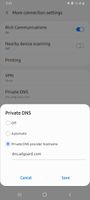
just change your dns... with adguard one..
Souravonline98
Active Level 7
Options
- Mark as New
- Subscribe
- Subscribe to RSS Feed
- Permalink
- Report Inappropriate Content
01-21-2021 03:44 PM in
Galaxy A
please tell me full process bro
Souravonline98
Active Level 7
Options
- Mark as New
- Subscribe
- Subscribe to RSS Feed
- Permalink
- Report Inappropriate Content
01-21-2021 03:47 PM in
Galaxy A
is it safe bro?
Solution
Anonymous
Not applicable
Options
- Mark as New
- Subscribe
- Subscribe to RSS Feed
- Permalink
- Report Inappropriate Content
01-21-2021 04:02 PM (Last edited 01-21-2021 04:05 PM ) in
Galaxy A
its safe dude...
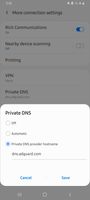
1.go to settings
2. click on connections
3.click on more connection settings at last
4.click on Private Dns there
5. click on the private dns provider hostname and type dns.adguard.com and select save.
1.go to settings
2. click on connections
3.click on more connection settings at last
4.click on Private Dns there
5. click on the private dns provider hostname and type dns.adguard.com and select save.

Souravonline98
Active Level 7
Options
- Mark as New
- Subscribe
- Subscribe to RSS Feed
- Permalink
- Report Inappropriate Content
01-21-2021 05:33 PM in
Galaxy A
thanks bro
Anonymous
Not applicable
Options
- Mark as New
- Subscribe
- Subscribe to RSS Feed
- Permalink
- Report Inappropriate Content
01-21-2021 06:24 PM in
Galaxy A
welcome bro..
