

- Mark as New
- Bookmark
- Subscribe
- Subscribe to RSS Feed
- Permalink
08-08-2022 11:29 AM (Last edited 08-08-2022 02:32 PM ) in
Tech TalkUser privacy, security and efficient browsing - these have always been Samsung Internet’s covenants! Samsung Internet browser is back with another update with enhanced usability and a higher level of user privacy and security. Check out the latest offerings with this version below.
Navigating links to Secret mode
This feature allows user to open a link from any app or website directly in Secret Mode, when needed. Enable the “Open links from other apps in secret mode” option and all the links from other apps will straight away open in Secret mode of the browser after successful authentication. This option is available when “Use Passwords” is enabled.

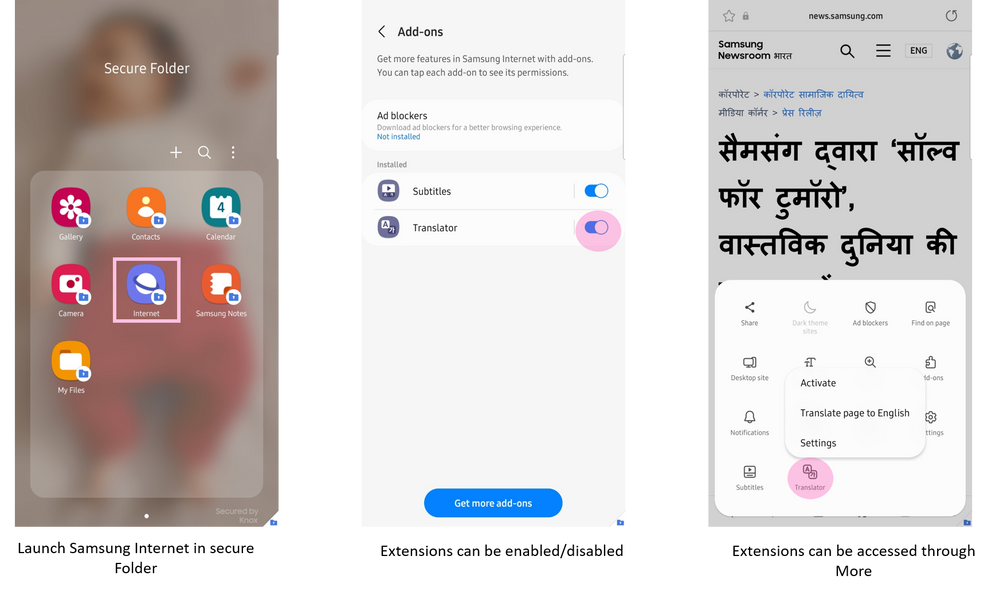
Extensions support in Secure Folder
Users can now access extensions in secure folder.
Here’s how this works-
Additional languages for translator extension
Based on a lot of user requests, Samsung Internet now has the capability to translate in 6 different Indian languages (Hindi, Bengali, Gujarati, Marathi, Tamil, Telugu) apart from the already supported languages from different regions.
Improved user experience
Enhancements to make Samsung Internet even more user-friendly!
Drag & drop support and folder selection in bookmarks
Users can now move bookmarks to a folder by tab-and-hold a bookmark and can also find folder hierarchy view when selecting location as shown in the gif below.
Apply zoom to this tab only
This option has been added to zoom dialog. When selected, this applies the zoom level to current tab only. When not selected, zoom level is applied to all the tabs.
Introducing close tabs
Close tab is available in Customize Menu where by closing the current tab will take the user to other tab and if the user closes the last tab - “No tab” will be shown.
In addition to the above, foldable users can place the URL bar and tool bar either at the top or at the bottom of the screen for improved accessibility.
Upgrade to Samsung Internet v18.0 now where web engine has been upgraded to Chromium m99.
Drop us a note in the comment section for any queries or feedback and we’d be happy to assist you.
Thank you for being a part of the Samsung Internet Browser family!

- Mark as New
- Subscribe
- Subscribe to RSS Feed
- Permalink
- Report Inappropriate Content
09-08-2022 02:56 PM in
Tech Talk
- Mark as New
- Subscribe
- Subscribe to RSS Feed
- Permalink
- Report Inappropriate Content
09-08-2022 03:03 PM in
Tech TalkAs there is no security apps which enables locks for all the apps
You have to download s secure for locking your apps
Samsung should bring in built security for locking apps

- Mark as New
- Subscribe
- Subscribe to RSS Feed
- Permalink
- Report Inappropriate Content
09-08-2022 03:09 PM in
Tech Talk
- Mark as New
- Subscribe
- Subscribe to RSS Feed
- Permalink
- Report Inappropriate Content
09-08-2022 03:33 PM in
Tech Talk
- Mark as New
- Subscribe
- Subscribe to RSS Feed
- Permalink
- Report Inappropriate Content
09-08-2022 03:55 PM in
Tech Talk
- Mark as New
- Subscribe
- Subscribe to RSS Feed
- Permalink
- Report Inappropriate Content
09-08-2022 04:08 PM in
Tech Talk
- Mark as New
- Subscribe
- Subscribe to RSS Feed
- Permalink
- Report Inappropriate Content
09-08-2022 04:10 PM in
Tech Talk
- Mark as New
- Subscribe
- Subscribe to RSS Feed
- Permalink
- Report Inappropriate Content
09-08-2022 04:11 PM in
Tech Talk
- Mark as New
- Subscribe
- Subscribe to RSS Feed
- Permalink
- Report Inappropriate Content
09-08-2022 04:17 PM in
Tech Talk
- Mark as New
- Subscribe
- Subscribe to RSS Feed
- Permalink
- Report Inappropriate Content
09-08-2022 04:18 PM in
Tech Talk
