

- Mark as New
- Bookmark
- Subscribe
- Subscribe to RSS Feed
- Permalink
01-05-2022 12:54 PM (Last edited 01-05-2022 12:56 PM ) in
Tech TalkAdd your Friends and Family to your Find network to easily keep track of your devices
Imagine that you lost your keys or a mobile phone. Your first natural reaction in such a situation is to ask friends and family about it, right? Well, SmartThings Find now enables this very experience to easily keep track for your devices.
You can get more people to search for your devices using SmartThings Find Members. Easily add your known people and enable them to locate the devices easily, no matter where they are! The trusted members can locate your device and you can manage which devices they can track.
So the next time you can’t seem to find your phone, you can literally just ask your friend or family, and they would know!
How to enable SmartThings Find Members?
1) Go to Home icon in SmartThings App > Manage Locations and then select the location you want to invite someone to
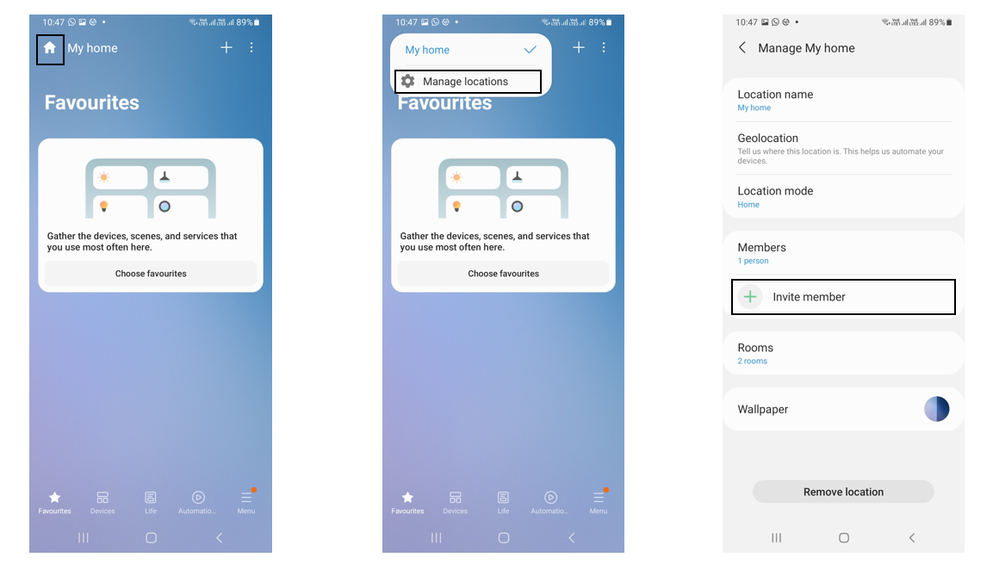
2) Tap invite member. You can invite someone by entering their email address or having them scan a QR Code

3) Enter the person’s email to send an invitation
4) If you are near the person, you can invite by scanning QR
5) After the person accepts the invitation, they’ll be able to monitor and control all of the devices in the location along with you
6) You can easily toggle location access from member’s tab

You can invite up to 19 members to help you out and up to 200 devices can be located at the same time. Finding and keeping track of your devices has never been easier!
SmartThings Find is now a community of more than 100 million nodes globally and is helping thousands of people locate their misplaced devices every days. The SmartThings Find support devices like Galaxy smartphones, smartwatches, earbuds, S-Pen pro and SmartTags or SmartTags+
Since the technology uses Bluetooth Low Energy, Galaxy users can locate the devices even if it’s offline. So, what are you waiting for? Add your friends and family to your SmartThings Find and get started today
Download SmartThings App here: Click here

- Mark as New
- Subscribe
- Subscribe to RSS Feed
- Permalink
- Report Inappropriate Content
01-24-2022 03:44 PM in
Tech Talk
- Mark as New
- Subscribe
- Subscribe to RSS Feed
- Permalink
- Report Inappropriate Content
01-24-2022 03:49 PM in
Tech Talk
- Mark as New
- Subscribe
- Subscribe to RSS Feed
- Permalink
- Report Inappropriate Content
01-24-2022 03:50 PM in
Tech Talk
- Mark as New
- Subscribe
- Subscribe to RSS Feed
- Permalink
- Report Inappropriate Content
01-24-2022 03:52 PM in
Tech Talk
- Mark as New
- Subscribe
- Subscribe to RSS Feed
- Permalink
- Report Inappropriate Content
01-24-2022 03:53 PM in
Tech Talk
- Mark as New
- Subscribe
- Subscribe to RSS Feed
- Permalink
- Report Inappropriate Content
01-24-2022 04:02 PM in
Tech Talk
- Mark as New
- Subscribe
- Subscribe to RSS Feed
- Permalink
- Report Inappropriate Content
01-24-2022 04:03 PM in
Tech Talk
- Mark as New
- Subscribe
- Subscribe to RSS Feed
- Permalink
- Report Inappropriate Content
01-24-2022 04:03 PM in
Tech Talk
- Mark as New
- Subscribe
- Subscribe to RSS Feed
- Permalink
- Report Inappropriate Content
01-24-2022 04:05 PM in
Tech Talk
- Mark as New
- Subscribe
- Subscribe to RSS Feed
- Permalink
- Report Inappropriate Content
01-24-2022 04:05 PM in
Tech Talk
