

- Mark as New
- Bookmark
- Subscribe
- Subscribe to RSS Feed
- Permalink
03-28-2022 10:54 AM (Last edited 03-28-2022 01:05 PM ) in
Tech TalkPoor reception and weak signals got you annoyed?
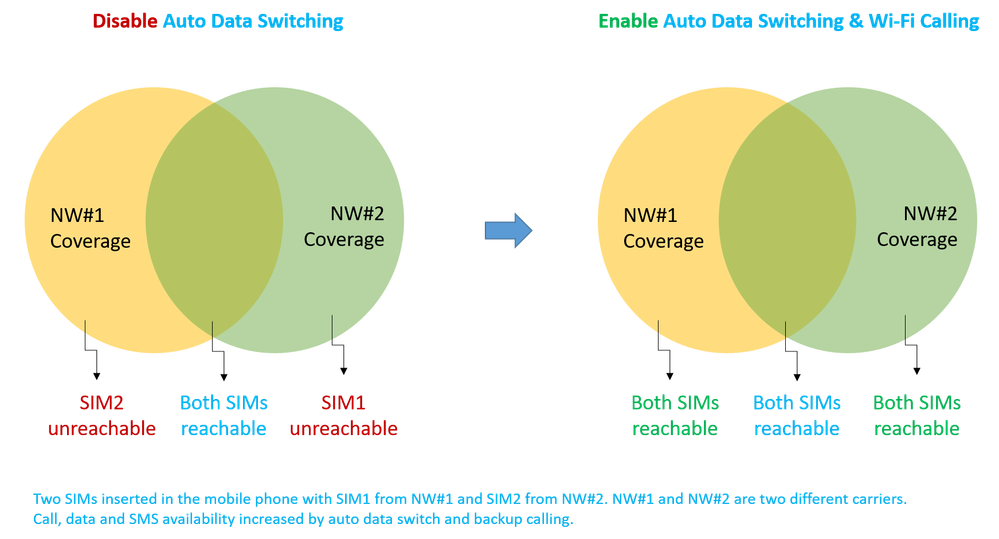
We know making calls, sending texts, and simple browsing can get frustrating in areas with limited network coverage by some carriers. In fact, another carrier might provide a better reception in those regions!
For this reason, many users rely on two SIM cards from different carriers for uninterrupted service.
But it isn’t a complete solution.
One, mobile data does not automatically switch between two SIM cards, making the experience disjointed.
Two, there is no call or text reachability on the out-of-coverage SIM card that makes important OTP and PAN/Aadhar linked transactions impossible.
Now, say goodbye to these challenges and hello to non-stop connectivity!
Presenting Samsung’s Auto data switching feature.
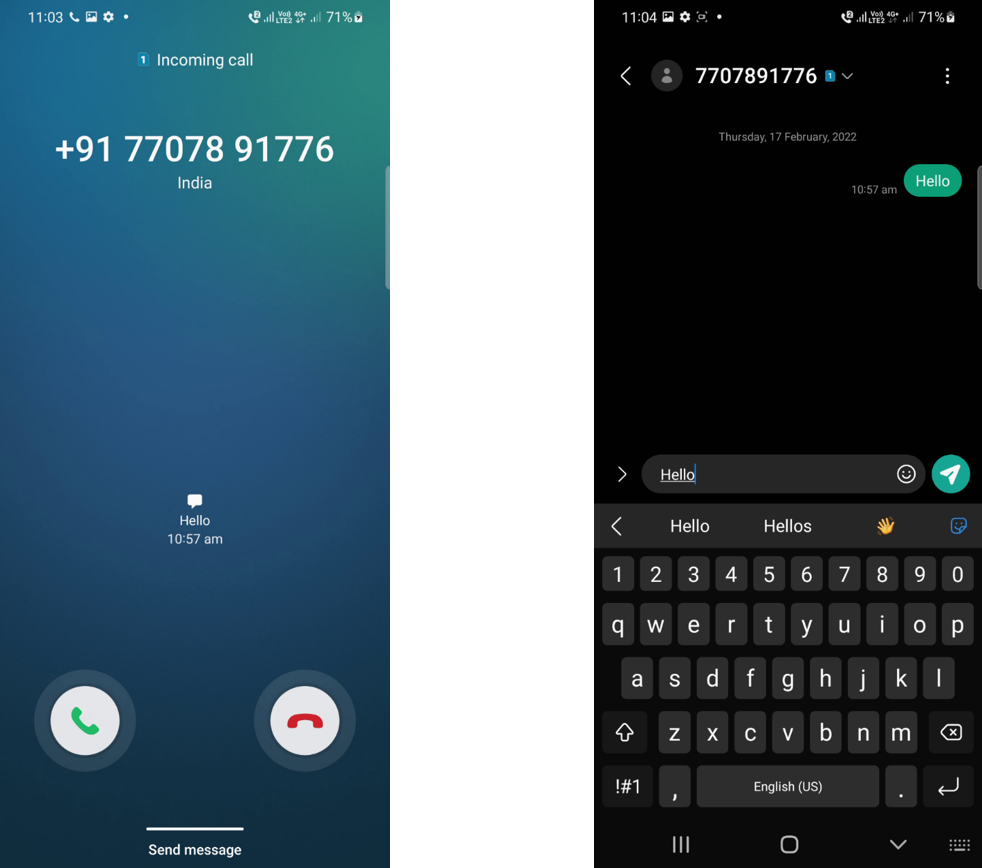
Calls and SMS of the out-of-coverage SIM work uninterrupted using the mobile data of second SIM. Enjoy this nifty feature by turning on ‘Auto data switching’ and ‘Wi-Fi Calling’ settings together.
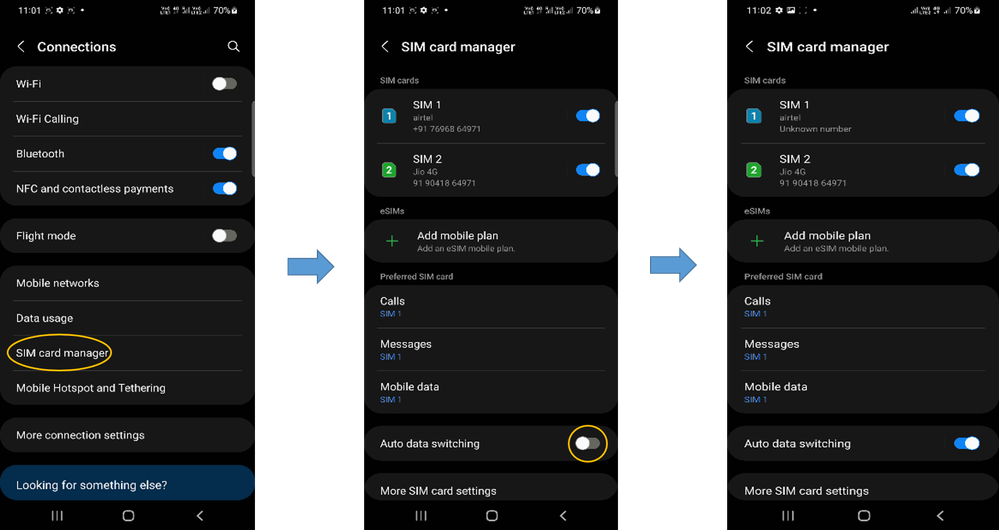
How do I enable Auto data switching?
- Go to Settings > Connections > Sim card manager > Auto data switching
- Tap to turn on Auto data switching
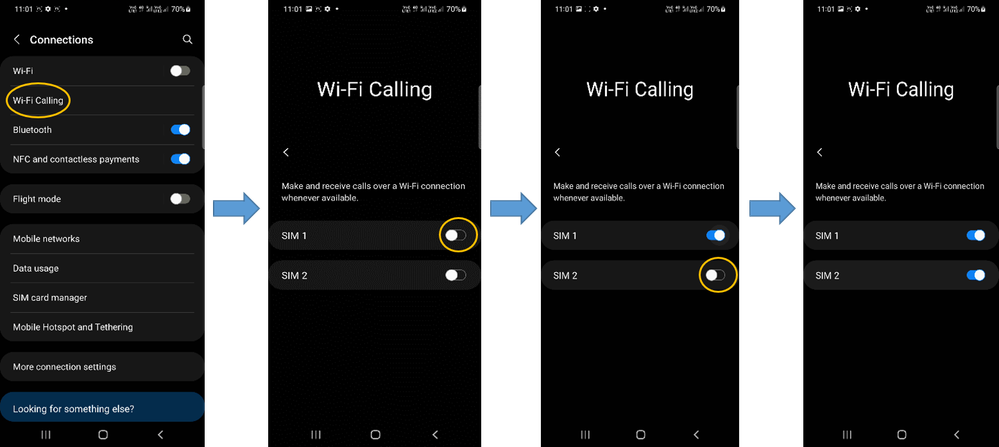
How do I enable Wi-Fi Calling?
- Go to Settings > Connections > Wi-Fi Calling
- Tap on SIM1 to turn on Wi-Fi Calling for SIM1
- Tap on SIM2 to turn on Wi-Fi Calling for SIM2
How do I know ‘Automatic data switching’ is on?
Simply check out the network icons on top of the screen! It will show the SIM whose data is being used. Here, SIM1 is using SIM2 data for connection. When SIM2 will use SIM1 data, the icon will change to number 1.

You can also check the registration status of the carrier network from the quick panel.

For a seamless experience, there will be no other visible change in your screen!
T&C: ‘Auto data switching’ feature is available on Samsung Galaxy phones from Android 12 onwards.

- Mark as New
- Subscribe
- Subscribe to RSS Feed
- Permalink
- Report Inappropriate Content
03-31-2022 08:06 PM in
Tech Talk
- Mark as New
- Subscribe
- Subscribe to RSS Feed
- Permalink
- Report Inappropriate Content
03-31-2022 08:07 PM in
Tech Talk
- Mark as New
- Subscribe
- Subscribe to RSS Feed
- Permalink
- Report Inappropriate Content
03-31-2022 08:07 PM in
Tech Talk
- Mark as New
- Subscribe
- Subscribe to RSS Feed
- Permalink
- Report Inappropriate Content
03-31-2022 08:08 PM in
Tech Talk
- Mark as New
- Subscribe
- Subscribe to RSS Feed
- Permalink
- Report Inappropriate Content
03-31-2022 08:11 PM in
Tech Talk
- Mark as New
- Subscribe
- Subscribe to RSS Feed
- Permalink
- Report Inappropriate Content
03-31-2022 08:12 PM in
Tech Talk
- Mark as New
- Subscribe
- Subscribe to RSS Feed
- Permalink
- Report Inappropriate Content
03-31-2022 08:12 PM in
Tech Talk
- Mark as New
- Subscribe
- Subscribe to RSS Feed
- Permalink
- Report Inappropriate Content
03-31-2022 08:14 PM in
Tech Talk
- Mark as New
- Subscribe
- Subscribe to RSS Feed
- Permalink
- Report Inappropriate Content
03-31-2022 08:14 PM in
Tech Talk
- Mark as New
- Subscribe
- Subscribe to RSS Feed
- Permalink
- Report Inappropriate Content
03-31-2022 08:17 PM in
Tech TalkPlease release some basic features to your core users like in-built screen recording & carrier aggregation (4G+).
In 2022, It is very shameful that ee don't have in-built screen recording or app lock features 😕.
Which we got freely in Android 10 or more.
Please take a look in my feedback.
Thanks 😊 🫂 🙏

