

- Mark as New
- Bookmark
- Subscribe
- Subscribe to RSS Feed
- Permalink
- Report Inappropriate Content
06-10-2018 11:50 AM in
Galaxy S
- Mark as New
- Subscribe
- Subscribe to RSS Feed
- Permalink
- Report Inappropriate Content
06-10-2018 12:06 PM in
Galaxy Stry this path
- Mark as New
- Subscribe
- Subscribe to RSS Feed
- Permalink
- Report Inappropriate Content
06-10-2018 05:31 PM (Last edited 03-14-2019 04:15 PM ) in
Galaxy S

- Mark as New
- Subscribe
- Subscribe to RSS Feed
- Permalink
- Report Inappropriate Content
06-10-2018 05:06 PM in
Galaxy Si check my like then keyboard automatically open..😥😥
and no notification badge on Facebook icon..😰
- Mark as New
- Subscribe
- Subscribe to RSS Feed
- Permalink
- Report Inappropriate Content
06-10-2018 05:58 PM (Last edited 03-14-2019 04:14 PM ) in
Galaxy S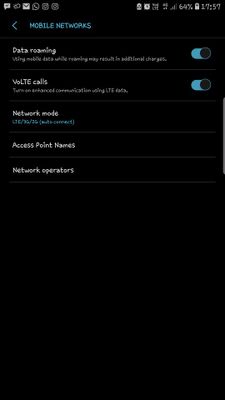

- Mark as New
- Subscribe
- Subscribe to RSS Feed
- Permalink
- Report Inappropriate Content
06-12-2018 02:43 PM in
Galaxy S- Use VoLTE SIM in SIM slot 1
- Menu > Settings > Connections > Mobile Networks > Network Mode > Select auto mode (GSM/WCDMA/LTE).
- Kindly go to settings >> General management >> Reset >> Reset network settings.
Be sure to hit ♡ when you find an answer that works for you. For Further assistance, you can get in touch with us via Live Chat option by following- http://livechat.support.samsung.com/Customer_new/IN. You can also connect us via Samsung Members web community by following mentioned url-https://community.samsungmembers.com/en_IN#/
- Mark as New
- Subscribe
- Subscribe to RSS Feed
- Permalink
- Report Inappropriate Content
08-27-2020 03:28 AM in
Galaxy S
 Samsung_Support
- Mark as New
- Subscribe
- Subscribe to RSS Feed
- Permalink
09-04-2020 06:03 PM in
Galaxy SDear Samsung Member,
Greetings from Samsung Customer Support!
Please perform the below mentioned steps to resolve the issue:
* Check network operator settings
Settings > Connections > Mobile networks > Network operators > Select automatically > OK > Registered on network.
Note: We recommend to set device network operators as LTE/3G/2G (auto connect) mode.
For further assistance, register your concern in Samsung Members Application (Open Samsung Members Application > Get help > Send Feedback > Error report/Ask questions).
Thank you for writing to Samsung.
Warm Regards,
Samsung Customer Support

- Mark as New
- Subscribe
- Subscribe to RSS Feed
- Permalink
- Report Inappropriate Content
08-21-2022 02:19 PM in
Galaxy S
