

- Mark as New
- Bookmark
- Subscribe
- Subscribe to RSS Feed
- Permalink
- Report Inappropriate Content
12-08-2019 12:13 AM (Last edited 12-08-2019 12:19 AM ) in
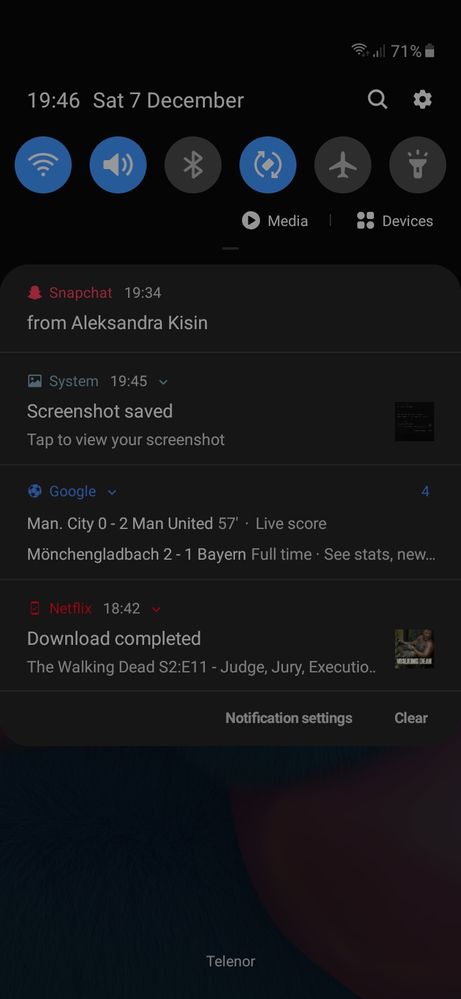
Galaxy AHi. I have been having a strange problem with my lockscreen. It look as there is no Amoled display. But when i take a screenshot blacks are ok,not the saturated colors.The colors are not rich and bright. An when i pull down the notofication pannel it is not real Amoled black instead is dark green or something like that. But when i take a screenshot blacks are ok,not the saturated colors. I have new A30s i have used it for past week or so.
If anyone has the answer to this problem please help
- Tags:
- A30s
- Lockscreen color
- Mark as New
- Subscribe
- Subscribe to RSS Feed
- Permalink
- Report Inappropriate Content
06-02-2020 04:07 PM in
Galaxy AI don't know the solution to this but if you are having problem ONLY in your wallpaper(like mine which had kind of a brownish tint) you can either close the dark mode or go to the dark mode settings and stop it from applying it to you wallpaper
- Mark as New
- Subscribe
- Subscribe to RSS Feed
- Permalink
- Report Inappropriate Content
11-26-2020 03:34 AM in
Galaxy ATHAT'S THE SOLUTION! THX!!!!!!!!!! ))))

- Mark as New
- Subscribe
- Subscribe to RSS Feed
- Permalink
- Report Inappropriate Content
06-15-2020 02:17 AM in
Galaxy A
- Mark as New
- Subscribe
- Subscribe to RSS Feed
- Permalink
- Report Inappropriate Content
06-25-2020 12:55 AM in
Galaxy ASame problem
- Mark as New
- Subscribe
- Subscribe to RSS Feed
- Permalink
- Report Inappropriate Content
07-02-2020 11:50 PM in
Galaxy AFacing the same issue. When i switched off the fingerprint scanner its unresolved but this is not the solution samsung should have to act responsibly and provide the a30s user with an update for this error correction.
- Mark as New
- Subscribe
- Subscribe to RSS Feed
- Permalink
- Report Inappropriate Content
07-15-2020 05:06 PM in
Galaxy A
- Mark as New
- Subscribe
- Subscribe to RSS Feed
- Permalink
- Report Inappropriate Content
07-19-2020 12:37 AM in
Galaxy ASame problem on the a30s! It got so aggressive I had to restart my phone, and the whole Samsung boot screen was grey. Samsung please fix this. It gets pretty disturbing visually. I understand we are not s20 users but please. I can't afford a hard reset as my phone is my main backup for now.

- Mark as New
- Subscribe
- Subscribe to RSS Feed
- Permalink
- Report Inappropriate Content
08-23-2020 04:18 AM in
Galaxy AI bought new A31 few days ago and facing the same issue. Last software update was 22 Aug 2020, that's 1st July 2020 patch.
So, Samsung haven't fixed it and new models are also launched with the same problem.
Seriously, just put the fingerprint sensor on backside if you can't solve the problem. Why building same faulty design????
- Mark as New
- Subscribe
- Subscribe to RSS Feed
- Permalink
- Report Inappropriate Content
03-05-2021 03:19 PM in
Galaxy ADoes it solve now? Because i have the same problem with my a51 i just bought it last week and update it to adroid 11 One UI 3.0
- Mark as New
- Subscribe
- Subscribe to RSS Feed
- Permalink
- Report Inappropriate Content
09-15-2020 07:29 AM in
Galaxy AMy screen color also faded when it get lock plzzz do somthing

