

Hiruka_NU
Expert Level 5
Options
- Mark as New
- Subscribe to RSS Feed
- Permalink
06-18-2021 08:14 AM in
Others
ගනන් ගන්න එපා මේක නිකන් ඔබ ඔබ ඉන්නකොට හම්බවෙච්ච එකක්..😂
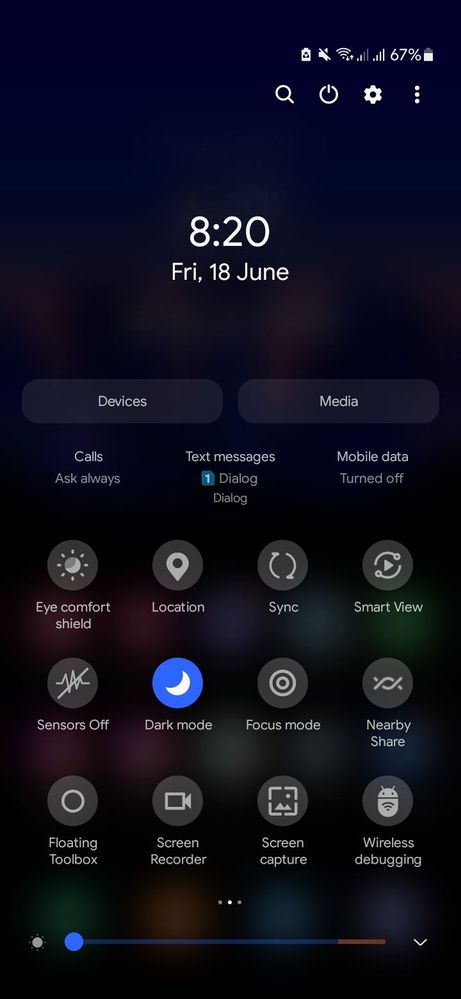
 3.දැන් මේ වගේ එකකට එයි.දැන් ඔය smartview කියල ලොකුවට තියෙන එක උඩ 10 පාරකට වැඩිය එක දිගට ඔබ ඔබ යන්න.
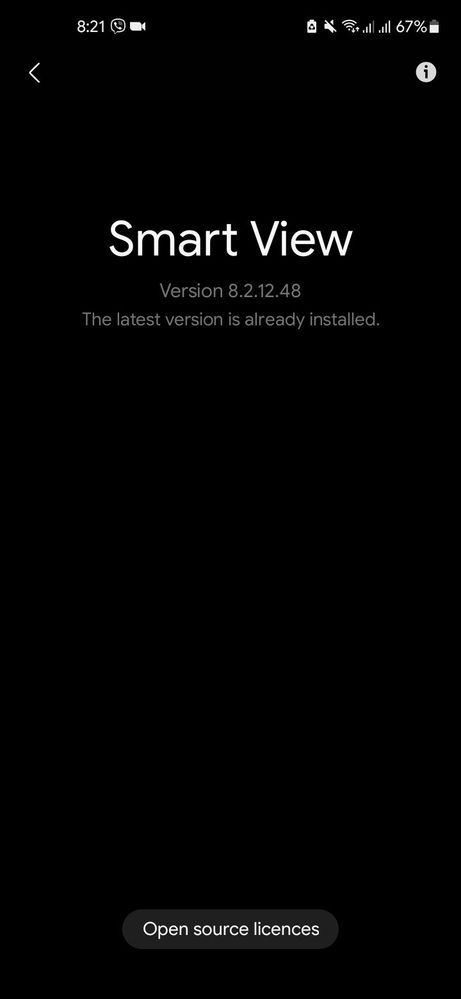


ඒ තමා ,Smartview වල devoloper options
ඉස්සෙල්ලම මේක On කරගෙන ඉමු........
How to👇👇👇👇👇
1.Notification panel එකේ smartview toggle එක ටික වෙලාවක් ඔබාගෙන ඉන්න.
2.ඊට පස්සෙ ඔයාලට තියෙන Device එක serch කරන තැනකට යයි.එතන උඩ දකුනු පැත්තෙ උඩ කෙලවරේ තියෙන තිත් 3 එබුවහම👇👇👇👇ඔය වගේ තැනකට වැටෙයි....ඕකෙ about smartview එක ඔබන්න.
4.ඊට පස්සෙ මේ වගේ එකකට වැටෙයි.ඕකෙ tik තියෙන ඒව මොකුත් කරන්න යන්න එපා.screen mirror වැඩ කරන්නෙ නැති වෙයි.ඔයාලට පේනව ඇති screen in option එකක් තියෙනවා.ඒක ඔබල ඊලඟ රූපෙ වගේ එකකට යන්න.
5.හරි දැන් තමා හොඳම හරිය..😂
මේකෙන් මං දන්න විදියට වෙන්නෙ
ඔයාලගෙ PC එකේහරි LAP එකේ හරි screen එක Phone එකට හරි Tab එකට හරි Share කරන්න පුලුවන් එක වෙන්න ඕනෙ.ඔයාල නිකමට Try කරල බලන්න.මට කරන්න විදියක් නෑ .මට PC එකක් නෑ.😂😂
මේකෙන් වෙන දේ ඔයාල කවුරුහරි දන්නවනම්.comment කරන්න.😂🥲😶😏
36 Comments


Hiruka_NU
Expert Level 5
Options
- Mark as New
- Subscribe to RSS Feed
- Permalink
06-18-2022 10:47 AM (Last edited 06-18-2022 10:48 AM ) in
Others
Widiyak na bro.Smart view walata hardware support one.hardware support nethi hindayi naththe.smart view app eka demmath weda karanne nah.e smart view weda kranna ona hardwares nethi nisa..play store eken monahri wifi walin screen share karana app ekal wage thama 😑
Hiruka_NU
Expert Level 5
Options
- Mark as New
- Subscribe to RSS Feed
- Permalink
06-18-2022 11:16 AM in
Others
https://play.google.com/store/apps/details?id=com.apowersoft.mirror
ඕක වගේ.Smart tv වලටත් ඔය app එක තියේ.LG නම් Region එක Indonesia දාල Content store eke balanna
ඕක වගේ.Smart tv වලටත් ඔය app එක තියේ.LG නම් Region එක Indonesia දාල Content store eke balanna


